-
Notifications
You must be signed in to change notification settings - Fork 36
Updated Billing and plans page #369
New issue
Have a question about this project? Sign up for a free GitHub account to open an issue and contact its maintainers and the community.
By clicking “Sign up for GitHub”, you agree to our terms of service and privacy statement. We’ll occasionally send you account related emails.
Already on GitHub? Sign in to your account
base: master
Are you sure you want to change the base?
Changes from all commits
File filter
Filter by extension
Conversations
Jump to
Diff view
Diff view
There are no files selected for viewing
| Original file line number | Diff line number | Diff line change | ||||||||||||||||||||||||||||
|---|---|---|---|---|---|---|---|---|---|---|---|---|---|---|---|---|---|---|---|---|---|---|---|---|---|---|---|---|---|---|
| @@ -1,65 +1,218 @@ | ||||||||||||||||||||||||||||||
| --- | ||||||||||||||||||||||||||||||
| title: How billing works | ||||||||||||||||||||||||||||||
| toc_max_heading_level: 4 | ||||||||||||||||||||||||||||||
| description: Learn how Plane's per-seat billing works, how to manage seats for admins and members and upgrade workspaces. | ||||||||||||||||||||||||||||||
| description: Learn how Plane's per-seat billing works, and how billing cycles, upgrades, and payments are handled. | ||||||||||||||||||||||||||||||
| --- | ||||||||||||||||||||||||||||||
|
|
||||||||||||||||||||||||||||||
| Unlike a majority of SaaS, our subscription models on Pro and higher plans are per-seat, not per-users. Learn why this model works great for you and how to manage your members versus seats. | ||||||||||||||||||||||||||||||
| Plane uses a per-seat billing model for paid plans. This means you pay for the number of seats in your workspace, not the total number of users. Understanding this distinction helps you manage costs effectively while giving flexibility to your team structure. | ||||||||||||||||||||||||||||||
|
|
||||||||||||||||||||||||||||||
| ## Per-seat model and billing | ||||||||||||||||||||||||||||||
| ## Why per-seat instead of per-user? | ||||||||||||||||||||||||||||||
|
|
||||||||||||||||||||||||||||||
| - You are billed per workspace you upgrade. On both Cloud and self-hosted Plane you can upgrade your workspace from **Billing and plans**. On self-hosted instances, your license key only unlocks one workspace. | ||||||||||||||||||||||||||||||
| Most SaaS tools charge per user. Every person who accesses the system counts toward your bill. Plane takes a different approach. | ||||||||||||||||||||||||||||||
|
|
||||||||||||||||||||||||||||||
| 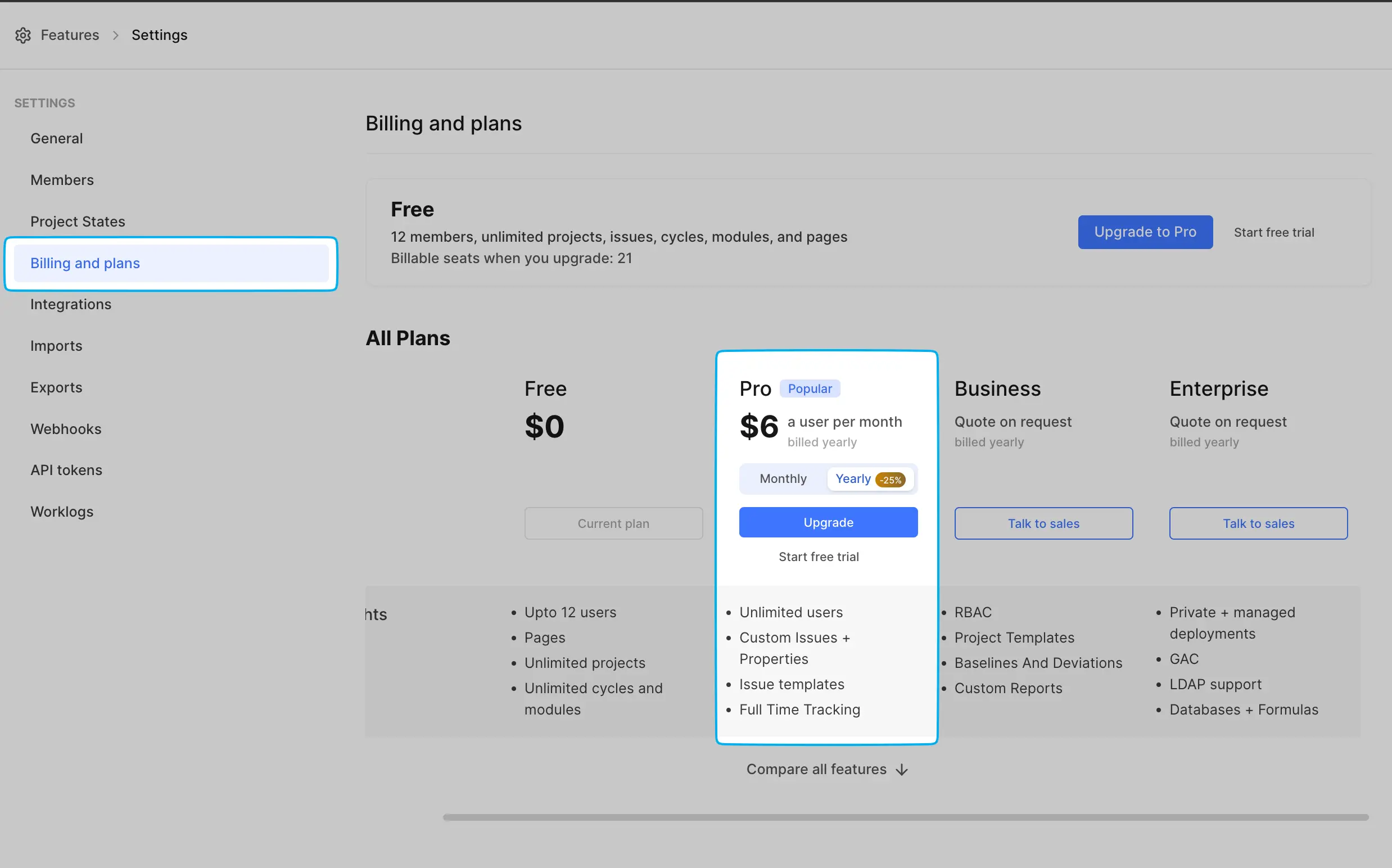 | ||||||||||||||||||||||||||||||
| **The per-seat model separates billing from user roles.** You purchase seats for users who need full access (Admins and Members), while users who need limited access (Guests) don't consume paid seats. This reflects how teams actually work: not everyone needs the same level of access. | ||||||||||||||||||||||||||||||
|
|
||||||||||||||||||||||||||||||
| - You are billed by the total number of seats in a workspace. So, if you have 100 Admins and Members across projects in a workspace, you will be billed for 100 seats. | ||||||||||||||||||||||||||||||
| - You get 5 Guests per paid seat. | ||||||||||||||||||||||||||||||
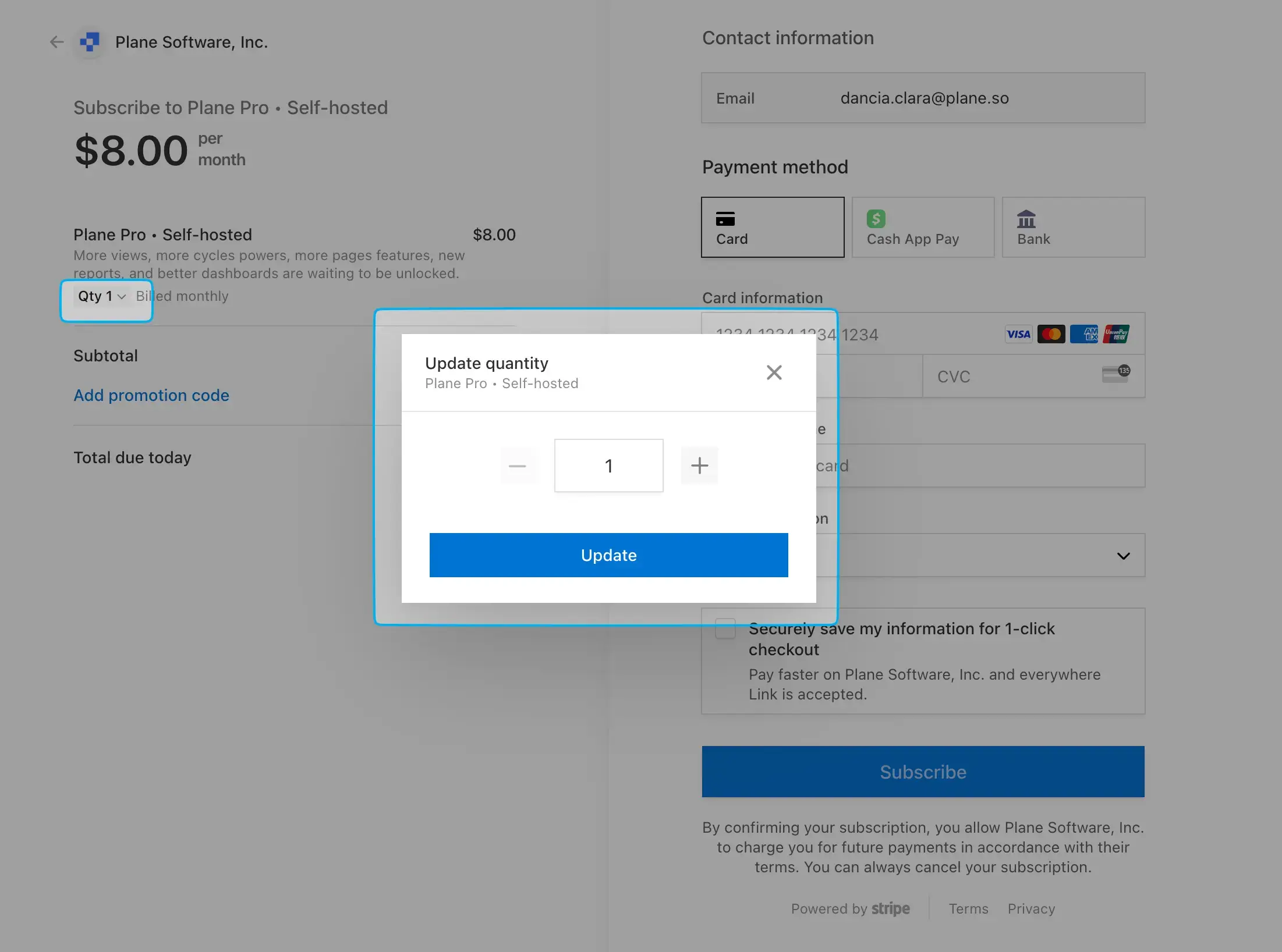
| - In the upgrade flow, you get as many seats as paid users—Admins or Members already in your workspace. For self-hosted instances, if you upgrade through the Prime portal, you can specify the number of seats you would like to purchase. You can also change this number later from the **Members** screen in **Workspace settings**. | ||||||||||||||||||||||||||||||
| For example, a typical workspace might have: | ||||||||||||||||||||||||||||||
| - 20 Admins and Members (core team) = 20 paid seats | ||||||||||||||||||||||||||||||
| - 100 Guests (stakeholders, clients, contractors) = 0 additional cost | ||||||||||||||||||||||||||||||
|
|
||||||||||||||||||||||||||||||
|  | ||||||||||||||||||||||||||||||
| With per-seat pricing, you pay for 20 seats and get 5 Guest slots per paid seat (100 total Guest slots). | ||||||||||||||||||||||||||||||
|
|
||||||||||||||||||||||||||||||
| - When you want to add members or change non-paid roles—Guests—to paid ones—Admins or Members—, you must add seats first. All new seats are immediately charged to the card on file. Depending on when you are adding more seats, your bill will either be prorated or show the full price of those seats. | ||||||||||||||||||||||||||||||
| :::warning | ||||||||||||||||||||||||||||||
| If we don't have your card on file, you will have to reach out to us each time you want to increase the number of seats or get your bill adjusted to a lower number of seats. | ||||||||||||||||||||||||||||||
| ::: | ||||||||||||||||||||||||||||||
| This model becomes more cost-effective as your Guest population grows. | ||||||||||||||||||||||||||||||
|
|
||||||||||||||||||||||||||||||
| - When you remove members, their seats are freed up and go to the available pool so you can assign them to other users. | ||||||||||||||||||||||||||||||
| **Removing members doesn't automatically remove seats. You must remove seats separately to affect your billing.** See [Manage paid users](/workspaces-and-users/add-remove-seats) for more details. | ||||||||||||||||||||||||||||||
| - When you remove seats, the reduced billing for those seats is added as a credit line item to your next bill, so your overall bill is reduced by the price of the removed seats. | ||||||||||||||||||||||||||||||
| ## How seat-based billing works | ||||||||||||||||||||||||||||||
|
|
||||||||||||||||||||||||||||||
| - Unless you change the number of seats in a month or year depending on your billing cycle, your subscription price for that cycle doesn't change. _The exception to that are limited-period discounts that some upgrades enjoy._ | ||||||||||||||||||||||||||||||
| ### Workspace-level billing | ||||||||||||||||||||||||||||||
|
|
||||||||||||||||||||||||||||||
| - Your subscription renews automatically each month or year at the beginning of the billing cycle. | ||||||||||||||||||||||||||||||
| Billing happens per workspace, not per organization. If you have multiple workspaces, each requires its own subscription. On self-hosted instances, each license key unlocks one workspace. | ||||||||||||||||||||||||||||||
|
|
||||||||||||||||||||||||||||||
| ### Free tiers, cancelations, and downgrades | ||||||||||||||||||||||||||||||
| When you upgrade a workspace from **Workspace Settings > Billing and plans**, you're charged for all paid seats in that workspace, regardless of how those seats are distributed across projects within the workspace. | ||||||||||||||||||||||||||||||
|
|
||||||||||||||||||||||||||||||
| Starting with v1.3.0 of the Commercial Edition, the Free plan will have a 12-seat limit just as there is for the Free tier on Cloud. If you are getting a new Free workspace on either our Cloud or our self-hosted Commercial Edition, this is the seat limit you will start with. | ||||||||||||||||||||||||||||||
| ### Seat allocation and usage | ||||||||||||||||||||||||||||||
|
|
||||||||||||||||||||||||||||||
| #### Older workspaces | ||||||||||||||||||||||||||||||
| **Seats are workspace resources that you assign to users.** When you upgrade, you purchase a specific number of seats. Those seats form a pool that you allocate to Admins and Members. | ||||||||||||||||||||||||||||||
|
|
||||||||||||||||||||||||||||||
| For everyone on the Free tier on both Cloud and the Commercial Edition before this change came in, you will see your workspace grandfathered to the same number of seats as the total number of admins or members in your workspace at the time of this change. | ||||||||||||||||||||||||||||||
| For example: | ||||||||||||||||||||||||||||||
| - You upgrade with 50 seats. | ||||||||||||||||||||||||||||||
| - You assign 45 seats to current Admins and Members. | ||||||||||||||||||||||||||||||
| - 5 seats remain available for future. | ||||||||||||||||||||||||||||||
|
|
||||||||||||||||||||||||||||||
| Say, you had 20 members and admins on your workspace before this change. Now, you will see a limit of 20 seats in your workspace instead of 12 and they will work exactly as detailed above. If you want to upgrade this workspace to Pro, you will be charged for all 20 seats. If you remove one of your 20 grandfathered seats, your new limit will be 19. | ||||||||||||||||||||||||||||||
| **The initial seat count matches your current team size.** When upgrading through Plane's interface, you automatically get as many seats as the number of Admins and Members currently in your workspace. On self-hosted instances upgrading through the Prime portal, you specify the seat count yourself. | ||||||||||||||||||||||||||||||
|
|
||||||||||||||||||||||||||||||
| You can remove seats down to 12 on such accounts. At 12, your workspace will downgrade to a standard Free account and you will lose your grandfathered status. | ||||||||||||||||||||||||||||||
|  | ||||||||||||||||||||||||||||||
|
|
||||||||||||||||||||||||||||||
| #### All workspaces | ||||||||||||||||||||||||||||||
| ### Guest allocation | ||||||||||||||||||||||||||||||
|
|
||||||||||||||||||||||||||||||
| If you have upgraded to a Pro or higher subscription and have unpaid bills, you will get a 30-day notice to pay them. After that period, your workspace will lock out all members except Workspace Admin to help them clear unpaid dues. | ||||||||||||||||||||||||||||||
| Every paid seat includes 5 Guest slots. These Guest slots are pooled at the workspace level, just like seats. If you have 20 paid seats, you get 100 Guest slots total (20 × 5). | ||||||||||||||||||||||||||||||
|
|
||||||||||||||||||||||||||||||
| Once you have paid your bills, you can continue with your subscription, change its frequency, adjust the number of seats, or downgrade to the Free tier by manually removing seats down to 12. | ||||||||||||||||||||||||||||||
| ## Managing seats over time | ||||||||||||||||||||||||||||||
|
|
||||||||||||||||||||||||||||||
| Should you cancel your subscription outright, your workspace will retain your subscription until the end of the billing cycle and then lock out all members except Workspace Admins who can renew the subscription or downgrade to the Free tier. | ||||||||||||||||||||||||||||||
| ### Adding seats | ||||||||||||||||||||||||||||||
|
|
||||||||||||||||||||||||||||||
| #### Refunds | ||||||||||||||||||||||||||||||
| **You must add seats before adding new paid users.** If all your seats are assigned and you want to add another Admin or Member, you first [purchase additional seats](/workspaces-and-users/add-remove-seats#add-seats) from **Workspace Settings > Members > Manage seats**. | ||||||||||||||||||||||||||||||
|
|
||||||||||||||||||||||||||||||
| We don’t offer refunds except in the most unusual circumstances. Your Plane billing happens automatically and our payment partners send alerts before each bill is attempted to be paid. | ||||||||||||||||||||||||||||||
| New seats are charged immediately to your card on file. The charge is either prorated (if you're mid-cycle) or at full price (if you're at the start of a cycle). | ||||||||||||||||||||||||||||||
|
|
||||||||||||||||||||||||||||||
| Should you think you have an exceptional circumstance and deserve a refund, write to us. | ||||||||||||||||||||||||||||||
| **Prorating works proportionally.** If you add 10 seats halfway through a monthly billing cycle, you're charged for 10 seats × 15 days (roughly half the monthly price). Those seats then renew at full price in your next billing cycle. | ||||||||||||||||||||||||||||||
|
|
||||||||||||||||||||||||||||||
| :::warning | ||||||||||||||||||||||||||||||
| If you don't have a payment method on file, you must contact [Plane support](/support/get-help) to adjust your seat count. The system can't automatically charge for new seats without payment information. | ||||||||||||||||||||||||||||||
| ::: | ||||||||||||||||||||||||||||||
|
|
||||||||||||||||||||||||||||||
| ### Removing seats | ||||||||||||||||||||||||||||||
|
|
||||||||||||||||||||||||||||||
| **Removing members doesn't reduce your bill.** When you remove a user from your workspace, their seat becomes available in the pool. You can reassign it to someone else. Your seat count and billing remain unchanged. | ||||||||||||||||||||||||||||||
|
|
||||||||||||||||||||||||||||||
| To actually reduce your billing, you must explicitly [remove seats](/workspaces-and-users/add-remove-seats#remove-unused-seats) from **Workspace Settings > Members > Manage seats**. This action removes any seats that aren't currently assigned to users. | ||||||||||||||||||||||||||||||
|
|
||||||||||||||||||||||||||||||
| When you remove seats, the cost reduction is applied as a credit on your next invoice. This credit is prorated based on how much of the billing cycle remains. | ||||||||||||||||||||||||||||||
|
|
||||||||||||||||||||||||||||||
| For example, if you remove 10 seats halfway through your monthly cycle, you receive a credit for 10 seats × 15 days (roughly half the monthly cost). | ||||||||||||||||||||||||||||||
|
|
||||||||||||||||||||||||||||||
| ### The seats-versus-members distinction | ||||||||||||||||||||||||||||||
|
|
||||||||||||||||||||||||||||||
| This distinction causes confusion, so it's worth emphasizing: | ||||||||||||||||||||||||||||||
|
|
||||||||||||||||||||||||||||||
| **Seats are billing units.** They represent capacity, the maximum number of paid users you can have. | ||||||||||||||||||||||||||||||
|
|
||||||||||||||||||||||||||||||
| **Members are people.** They're the actual users assigned to your workspace. | ||||||||||||||||||||||||||||||
|
|
||||||||||||||||||||||||||||||
| Actions on members (adding, removing, changing roles) don't automatically affect your seat count or billing. Actions on seats (purchasing, removing) directly affect your billing. | ||||||||||||||||||||||||||||||
|
|
||||||||||||||||||||||||||||||
| ## Subscription lifecycle | ||||||||||||||||||||||||||||||
|
|
||||||||||||||||||||||||||||||
| ### Automatic renewals | ||||||||||||||||||||||||||||||
|
|
||||||||||||||||||||||||||||||
| Subscriptions renew automatically at the start of each billing cycle (monthly or annual, depending on what you selected). The renewal charge is processed through your payment method on file. | ||||||||||||||||||||||||||||||
|
|
||||||||||||||||||||||||||||||
| Stripe, Plane's payment processor, handles the renewal: | ||||||||||||||||||||||||||||||
| 1. An invoice is generated at the renewal date. | ||||||||||||||||||||||||||||||
| 2. The charge is attempted on your payment method. | ||||||||||||||||||||||||||||||
| 3. If successful, your subscription continues. | ||||||||||||||||||||||||||||||
| 4. If unsuccessful, Stripe retries the payment 3-5 times over 14 days. | ||||||||||||||||||||||||||||||
| 5. After 14 days of failed attempts, the subscription is automatically cancelled. | ||||||||||||||||||||||||||||||
|
Comment on lines
+88
to
+93
|
||||||||||||||||||||||||||||||
| Stripe, Plane's payment processor, handles the renewal: | |
| 1. An invoice is generated at the renewal date. | |
| 2. The charge is attempted on your payment method. | |
| 3. If successful, your subscription continues. | |
| 4. If unsuccessful, Stripe retries the payment 3-5 times over 14 days. | |
| 5. After 14 days of failed attempts, the subscription is automatically cancelled. | |
| For Plane Cloud subscriptions, Stripe, Plane's payment processor, handles the renewal: | |
| 1. An invoice is generated at the renewal date. | |
| 2. The charge is attempted on your payment method. | |
| 3. If successful, your subscription continues. | |
| 4. If unsuccessful, Stripe retries the payment 3–5 times over 14 days. | |
| 5. For Plane Cloud, if payment still fails after this 14-day retry period, the subscription is automatically cancelled. Self-hosted license cancellation timing is described in the self-hosted section below. |
Copilot
AI
Mar 7, 2026
There was a problem hiding this comment.
Choose a reason for hiding this comment
The reason will be displayed to describe this comment to others. Learn more.
This states that self-hosted subscriptions cancel 7 days after the failed payment cycle, which conflicts with the earlier statement that cancellation happens after 14 days of failed attempts. Please reconcile these timelines (and ideally explain what "failed payment cycle" means in terms of dates/invoice state).
| When a payment fails, Stripe attempts to collect payment 3-5 times over 14 days. You receive email notifications after each failed attempt. | |
| If all payment attempts fail: | |
| - Cloud workspaces: Subscription cancels after 14 days | |
| - Self-hosted workspaces: Subscription cancels 7 days after the failed payment cycle | |
| When a payment fails, Stripe attempts to collect payment 3-5 times over a 14-day period. You receive email notifications after each failed attempt. | |
| If all payment attempts fail, the payment cycle is considered failed and Stripe typically marks the related invoice as `uncollectible` after the 14-day retry period. At that point: | |
| - Cloud workspaces: Subscription cancels automatically after the 14-day retry period | |
| - Self-hosted workspaces: Subscription cancels automatically after the 14-day retry period |
Copilot
AI
Mar 7, 2026
There was a problem hiding this comment.
Choose a reason for hiding this comment
The reason will be displayed to describe this comment to others. Learn more.
The "Unpaid bills" flow says users receive a 30-day notice and only then enter a restricted state, which seems inconsistent with the earlier failed-payment flow that cancels after 14 days. Please clarify the relationship between failed payments vs unpaid invoices (e.g., does cancellation happen first, or does the workspace remain active-but-restricted?) and align the timelines.
| If you have an active subscription with unpaid invoices, you receive a 30-day notice to clear the balance. After 30 days, your workspace enters a restricted state: | |
| - All members except Workspace Admins are locked out. | |
| - Workspace Admins can access **Workspace Settings > Billing and plans**. | |
| - No project work is accessible until bills are paid. | |
| Once you pay outstanding invoices, full workspace access is restored immediately. | |
| In addition to the failed payment flow above (where Stripe retries charges for up to 14 days and may cancel your subscription), invoices can remain unpaid if charges continue to fail or if you pay by invoice/manual payment. When an invoice stays unpaid for 30 days after its due date, your workspace enters a restricted state: | |
| - All members except Workspace Admins are locked out. | |
| - Workspace Admins can access **Workspace Settings > Billing and plans** to update payment details and pay overdue invoices. | |
| - No project work is accessible until bills are paid, regardless of whether your subscription is currently active or has been cancelled/downgraded. | |
| Once you pay outstanding invoices, full workspace access is restored immediately, and you can reactivate or upgrade your subscription as needed. |
There was a problem hiding this comment.
Choose a reason for hiding this comment
The reason will be displayed to describe this comment to others. Learn more.
This section says new seats are "charged immediately to your card on file", but the dedicated "Add or remove seats" guide instructs users to "Complete payment in Stripe" as part of adding seats. Please adjust wording here to match the actual UX (automatic charge vs redirect/Stripe portal payment) so the two docs don't give conflicting expectations.