Give your .NET AI assistant persistent memory.
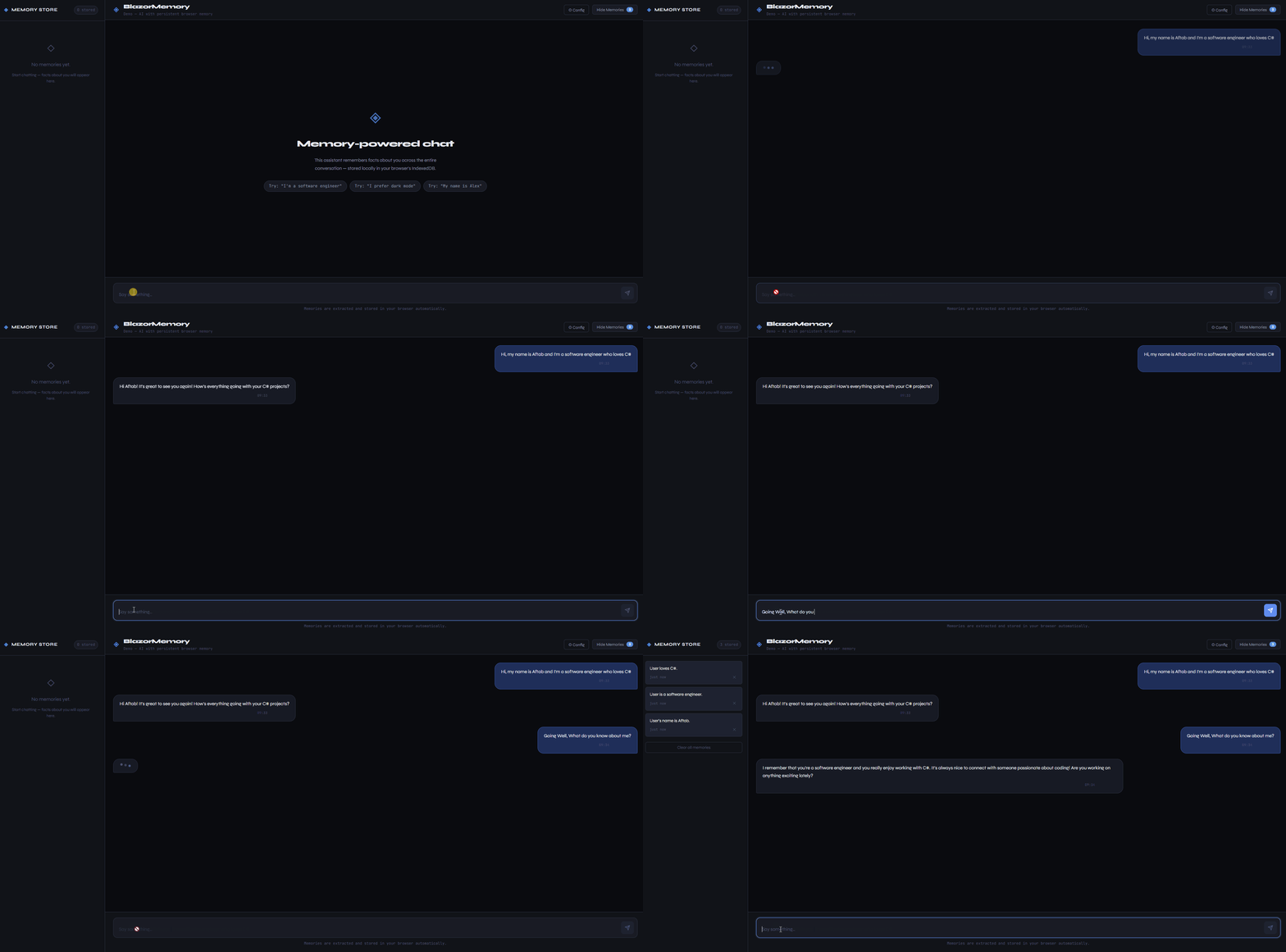
BlazorMemory sits between your chat logic and your LLM. It extracts facts from conversations, stores them as vector embeddings, and injects relevant context into future prompts. Your assistant remembers the user across sessions.
It works in Blazor WASM with no backend. Memories live in the browser's IndexedDB. It also works server-side with EF Core if you need SQL storage.
dotnet add package BlazorMemory
dotnet add package BlazorMemory.Storage.IndexedDb
dotnet add package BlazorMemory.Embeddings.OpenAi
dotnet add package BlazorMemory.Extractor.OpenAi
// Program.cs
builder.Services
.AddBlazorMemory()
.UseIndexedDbStorage()
.UseOpenAiEmbeddings(apiKey)
.UseOpenAiExtractor(apiKey);// In your chat service
public class ChatService(IMemoryService memory)
{
public async Task<string> ChatAsync(string message, string userId)
{
var memories = await memory.QueryAsync(message, userId,
new QueryOptions { Limit = 5, Threshold = 0.65f });
var context = string.Join("\n", memories.Select(m => $"- {m.Content}"));
var prompt = $"You are a helpful assistant.\n\nWhat you know:\n{context}";
var reply = await CallLlmAsync(prompt, message);
await memory.ExtractAsync($"User: {message}\nAssistant: {reply}", userId);
return reply;
}
}dotnet add package BlazorMemory.Components<MemoryPanel UserId="@userId" IsOpen="true" />The panel shows stored memories, handles delete and clear, has built-in export and import buttons, and thumbs up/down feedback to control which memories matter most.
Users can mark memories as important or unimportant. Important memories get boosted in search results. Unimportant ones get down-ranked but not deleted.
await memory.MarkImportantAsync(memoryId);
await memory.MarkUnimportantAsync(memoryId);
await memory.ResetImportanceAsync(memoryId);For cases where extraction loses important context, store conversations verbatim:
await memory.StoreVerbatimAsync(userId, conversation);
var results = await memory.SearchVerbatimAsync(userId, query, topK: 5);var json = await memory.ExportAsync(userId);
await memory.ImportAsync(userId, json);await memory.ExtractAsync(conversation, userId, namespace: "work");
var results = await memory.QueryAsync(query, userId, new QueryOptions
{
Namespace = "work"
});dotnet add package BlazorMemory.Storage.EfCorebuilder.Services
.AddBlazorMemory()
.UseEfCoreStorage<YourDbContext>()
.UseOpenAiEmbeddings(apiKey)
.UseOpenAiExtractor(apiKey);dotnet add package BlazorMemory.Extractor.Anthropicbuilder.Services
.AddBlazorMemory()
.UseIndexedDbStorage()
.UseOpenAiEmbeddings(openAiKey)
.UseAnthropicExtractor(anthropicKey);| Package | Description |
|---|---|
BlazorMemory |
Core library |
BlazorMemory.Components |
Drop-in MemoryPanel component |
BlazorMemory.Storage.IndexedDb |
Browser storage, no backend |
BlazorMemory.Storage.InMemory |
For testing |
BlazorMemory.Storage.EfCore |
SQL Server, PostgreSQL, SQLite |
BlazorMemory.Embeddings.OpenAi |
OpenAI text-embedding-3-small |
BlazorMemory.Extractor.OpenAi |
OpenAI gpt-4o-mini |
BlazorMemory.Extractor.Anthropic |
Anthropic Claude |
MIT